


UX Design in Software Development: A Practical Guide
1. What UX Design Actually Means in a Software Development Context
2. Why UX Design Matters for Software Development Outcomes
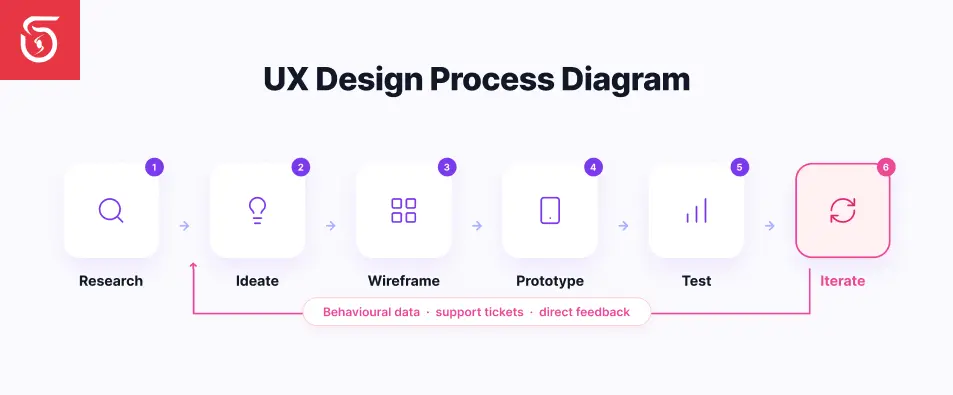
3. The Core UX Design Process in Software Development
4. How AI Is Actually Changing UX Design
5. Common UX Design Mistakes in Software Development
6. Inclusive and Accessible Design: A Non-Negotiable, Not an Add-On
7. Developer Experience (DevUX): UX Principles Applied Internally
8. Creating Better Software Through UX Design
What UX Design Actually Means in a Software Development Context
Why UX Design Matters for Software Development Outcomes
- ◆Lower long-term development cost. Fixing a usability issue identified during design is significantly cheaper than fixing the same issue after the product has shipped and users have already formed habits around the broken flow.
- ◆Higher adoption and retention. Users who find a product confusing don't usually complain. They just quietly stop using it. Good UX directly affects whether people come back.
- ◆Reduced support burden. A meaningful share of support tickets trace back to confusing flows or unclear interface decisions rather than genuine bugs. Those are problems UX work prevents before they ever reach a support queue.
- ◆Stronger product-market signal. When a product is genuinely easy to use, it's easier to tell whether a feature failed because of the idea or because of the execution. Muddy UX makes that signal much harder to read.
The Core UX Design Process in Software Development
1. User Research
2. Information Architecture
3. Wireframing and Prototyping
4. Usability Testing
5. Iteration Post-Launch
How AI Is Actually Changing UX Design
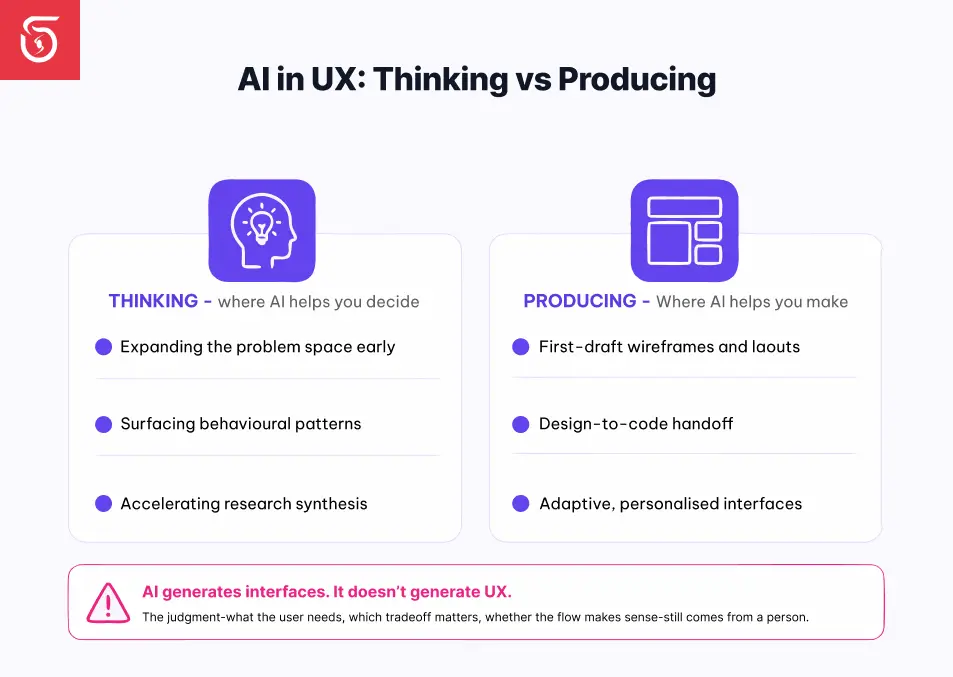
Where AI Helps With Thinking
- ◆Expanding the problem space early. Rather than starting from a blank page, AI can generate multiple rough directions to react to and refine, speeding up the ideation phase of a project.
- ◆Surfacing behavioral patterns. AI can analyze what users actually click and use, reducing how much of a roadmap gets shaped by opinion alone in a meeting room.
- ◆Accelerating research synthesis. AI tools can help summarize qualitative research and usability sessions faster, shortening cycles that used to take days of manual review.
Where AI Helps With Production
- ◆Generating first-draft wireframes and UI layouts to eliminate blank-page friction during early design phases.
- ◆Bridging design and development handoff, with newer tools translating design intent more directly into working front-end code, reducing some of the friction in that handoff.
- ◆Adaptive, personalized interfaces that adjust based on individual user behavior in real time. This is one of the more genuinely new capabilities AI brings to UX, rather than just accelerating an existing step.
Where AI Is Genuinely Misleading
Common UX Design Mistakes in Software Development
- ◆Treating UX as a final styling pass. Bringing in design only after the engineering architecture is locked means usability problems get discovered too late to fix without significant rework.
- ◆Designing for the "wow" instead of the workflow. A flashy, novel interface can look impressive in a demo and still frustrate someone trying to complete a routine task quickly, day after day.
- ◆Skipping usability testing because the team is confident. Internal confidence is a poor substitute for watching an actual unfamiliar user attempt the task cold.
- ◆Ignoring feedback and error states. Unclear loading indicators, vague error messages, or missing confirmation cues quietly erode trust even when the core functionality works correctly.
- ◆Designing the happy path only. Real users hit edge cases, make mistakes, and arrive with incomplete information. UX that only accounts for the ideal scenario breaks down constantly in practice.
- ◆Mistaking AI-generated polish for validated UX. As above, a clean AI-drafted interface still needs real research and testing behind it, not just visual confidence.
Inclusive and Accessible Design: A Non-Negotiable, Not an Add-On
Developer Experience (DevUX): UX Principles Applied Internally

Never Miss an Update
Add SoftSages Technology as a Preferred Source on Google for more of our latest tech content in AI Mode and AI Overviews.
Creating Better Software Through UX Design
Building software your users will actually want to use, not just one that technically works? SoftSages technology combines user-centered UX design with full-stack software development, helping businesses build products people adopt, return to, and recommend. and get a clear, no-pressure assessment of your product's UX.
Table of contents
What UX Design Actually Means in a Software Development Context
Why UX Design Matters for Software Development Outcomes
The Core UX Design Process in Software Development
How AI Is Actually Changing UX Design
Common UX Design Mistakes in Software Development
Inclusive and Accessible Design: A Non-Negotiable, Not an Add-On
Developer Experience (DevUX): UX Principles Applied Internally
Creating Better Software Through UX Design
Join Our Newsletter
Get the latest tech trends, tutorials and expert analysis delivered straight to your inbox.
FAQs about UX Design in Software Development
UX design in software development is the practice of shaping how a product feels and functions for the user, covering research, information architecture, interaction design, and usability testing throughout the development process, not just visual styling.
UI design focuses on the visual surface of a product: colors, layout, and typography. UX design focuses on the underlying structure and flow, meaning whether the product is actually easy and logical to use, regardless of how it looks.
Good UX design improves adoption, reduces support costs, and lowers long-term development costs by catching usability issues early rather than after launch, when fixes are significantly more expensive.
AI is speeding up early ideation, UI drafting, and research synthesis, and enabling adaptive interfaces that adjust to user behavior. However, AI-generated interfaces still require human validation, research, and judgment to be genuinely usable.
No. AI accelerates specific steps like wireframing and ideation, but understanding real user needs, validating flows through testing, and making judgment calls about tradeoffs still requires human UX expertise.
A typical UX design process includes user research, information architecture, wireframing and prototyping, usability testing, and continuous post-launch iteration based on real user behavior and feedback.
Common mistakes include treating UX as a final styling step, designing only for the "happy path," skipping usability testing, and mistaking polished AI-generated mockups for fully validated user experience work.
DevUX (Developer Experience) applies UX design principles to internal developer tools, APIs, and documentation, improving clarity and reducing friction for the engineers and technical users who rely on them daily.
Accessible design ensures products work well for users with different abilities, devices, and contexts. Designing for genuine inclusivity from the research phase tends to improve the experience for all users, not just those with specific accessibility needs.
UX design should start during initial research and planning, before engineering architecture is finalized. Bringing in UX only at the end of development makes usability issues far more expensive and difficult to fix.